Nadi: End-to-End Warranty Automation for a Malaysian Product Company
Nadi: End-to-End Warranty Automation
The Problem
A Malaysian SME selling handcrafted decorative wall art needed to automate their entire product warranty lifecycle. Their existing process was fully manual: customers buy a product, fill out a Google Form for warranty registration, and then someone on the team manually verifies the submission, sends a WhatsApp message confirming warranty activation, and tracks everything by hand in a spreadsheet. This doesn't scale, and it breaks down outside business hours.
What Was Built
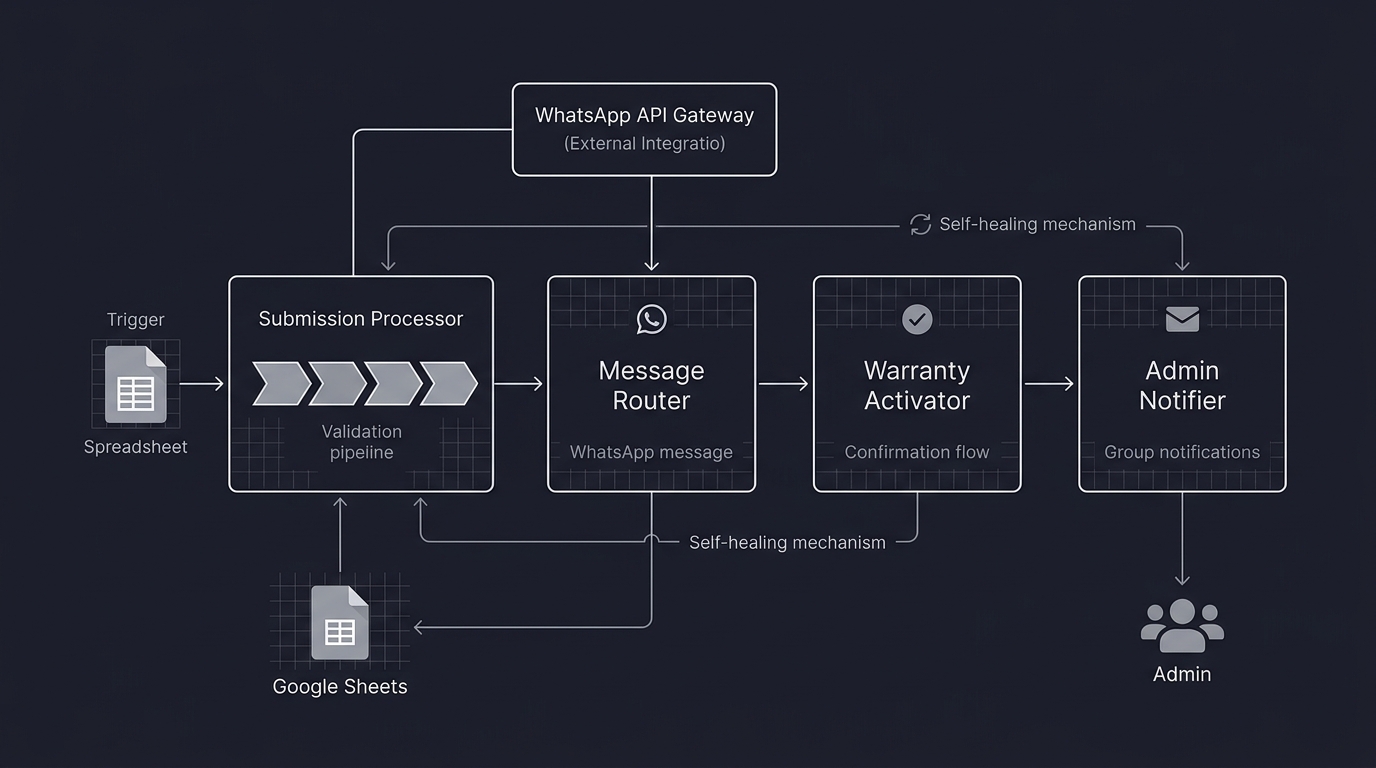
A system called Nadi (Malay for "pulse") that automates the full warranty journey end-to-end, with zero manual intervention required during normal operation.
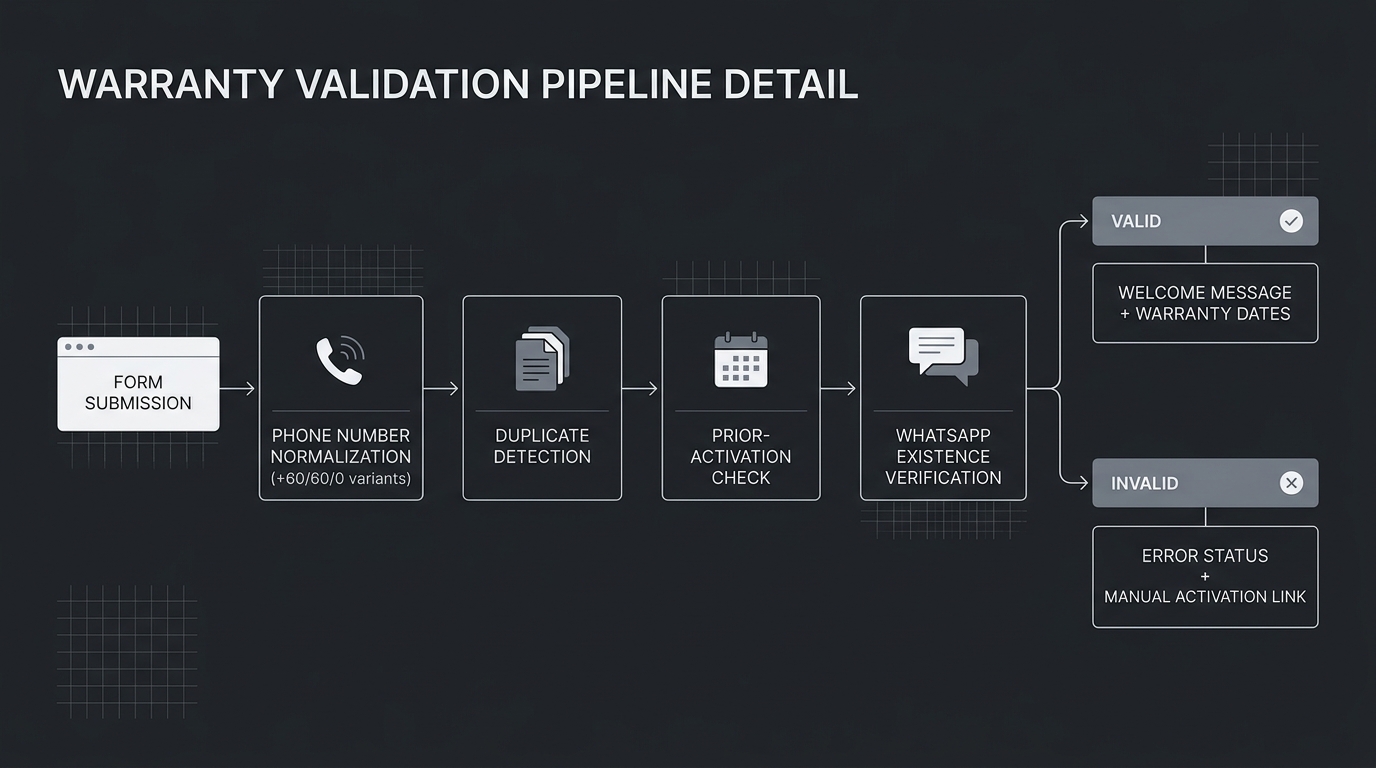
Warranty Submission Processor. The engine. Monitors the cloud spreadsheet for new form submissions and runs a multi-step validation pipeline: Malaysian phone number normalisation (handling +60, 60, and 0 prefix variants), duplicate detection, prior-activation checks, and WhatsApp number existence verification via the WhatsApp HTTP API. Valid entries get a personalised welcome message in Malay with masked email and dynamically calculated warranty dates. Invalid entries get descriptive error statuses written back to the sheet, plus a generated manual activation link as fallback.
Incoming Message Router & Warranty Activator. Handles all inbound WhatsApp messages. When a customer replies "YA" to the welcome message, the workflow looks up their record, marks the warranty as confirmed, sends a Malay-language confirmation, and notifies the admin group. Architecture is intentionally lean to accommodate future message-driven features.
Admin Notification Utility. A reusable sub-workflow that centralises all admin-facing notifications (new registrations, successful activations, errors) into a single WhatsApp group. Any component that needs to alert the team routes through this rather than implementing its own notification logic.
Manual Activate Webhook & UI. A browser-based fallback for edge cases. Error rows in the Google Sheet contain a clickable hyperlink that triggers activation for that specific customer via a styled HTML page. Success shows confirmation details; failure shows error context with a "Report This" button that opens WhatsApp to the developer with pre-filled diagnostic info.
Design Decisions
Cloud spreadsheet over a database. The client's team already lived in spreadsheets. Adding a database would have created adoption friction. The right data layer is the one people actually use.
Natural Malay, not template corporate language. All customer-facing messages were co-designed with the client to sound like a real person talking, not an automated system.
Graceful degradation at every layer. Every failure point (invalid phone, not on WhatsApp, duplicate submission, OAuth token expiry) has a defined response: the sheet gets updated with a human-readable status, a manual activation link is generated, and the admin group gets notified. A self-healing mechanism auto-deactivates the main workflow if the spreadsheet trigger breaks, preventing runaway error loops from burning execution quota.
Zero infrastructure cost. The entire system runs on a managed hosting free tier. A self-hosted automation engine over Zapier, a self-hosted WhatsApp gateway over the official Business API, cloud spreadsheets over a database. Deliberate choices to keep the client's operating cost at zero while still delivering a production-grade system.
Full-Service Delivery
This wasn't "here's your code, good luck." The project included requirements gathering (in-person), system architecture documentation, WhatsApp message template co-design with the client, a formal project completion report delivered via wiki with an operations manual written for a non-technical admin audience, and ongoing monthly maintenance.
* Images are conceptualized, not the real implementation to protect client's intellectual right